Website Spotlights

If an old spotlight exists, please reuse it by changing the dates.
Create a new spotlight

Images

  • Full-color photographs, illustrations, or AI generated artwork.
  • Minimum of 480pixels wide. Do not resize large images - the uploader will automatically create a number of sizes and use the appropriate one.
  • Horizontal format with the subject roughly in the middle. The images may appear wider or narrower depending on the specific device they are displayed on.
  • Licensed for free use without attribution. Pexels.com , Pixabay, and Unsplash are good sources.
  • DO NOT overlay text on the image.
  • If possible, work with the blue, grey and gold of the website.
  • Alternative text should be very brief. Most Spotlight images exist only to provide visual appeal to sighted users. Long descriptions of such images are distracting and irrelevant to users accessing the site via screen reader.

Titles

  • 2-8 words and less than one line of text when displayed on a laptop.
  • Every word should convey meaningful information.
  • Clearly communicate value to the user.
  • Follow Nielsen Norman Microcontent Guide

Body text

Begin and End Dates

These dates control when the Spotlight will appear on the site. Note that some existing spotlights have End Dates many years in the future; do not change these end dates as they are intended as fallbacks for times when no other Spotlights are active.
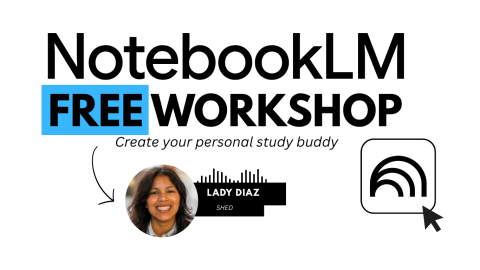
Notebook LM Workshop

Image
Notebook LM Workshop

The workshop will explore NotebookLM, an AI-powered research assistant designed to help users refine and organize their ideas. Participants will learn how to use all the NotebookLM tools to create their dream study guide.

Register Now!

Date and time

  • Jan 7, 2026 from 12:00 PM to 1:00 PM 

  • Jan 09, 2026 from 12:00 PM to 1:00 PM

  • Jan 14, 2026 from 12:00 PM to 1:00 PM 

  • Jan 21, 2026 from 12:00 PM to 1:00 PM 

Location

Center Building, Room 234

Key concepts and skills covered include:

  • Adding materials quickly, including PDFs, websites, Google Docs, YouTube videos, audio files, and Google Slides.
  • "Chatting" with the notebook to retrieve grounded information based only on uploaded sources, supported by clear in-line citations for accuracy and trust.
  • Transforming uploaded content into various accessible study tools, such as study guides, briefings, mind maps, and audio overviews.
  • Utilizing Gemini's advanced reasoning across different communication methods like text, graphs, images, and audio.

Important Requirement Note:

Access requires an LCC Student Google Account, and user privacy is maintained as personal data is never used to train NotebookLM.

Register Now!

Contact Information: (541) 463 - 3333 or shed@lanecc.edu
Celebrate Dia de los Muertos!

Image
Skull with flowers

Join the Library Makerspace on Oct 29 & 30 (10 AM - noon) to prepare a Dia de los Muertos ofrenda! Create your own skull memento or write a token of remembrance for a loved one. Dia de los Muertos is celebrated on Nov 1 - 2. The Library ofrenda will be up through Nov 7. Stop by and share your love for a remembered friend or family member.